


As voice interaction, acoustic analysis, and AI-enabled applications continue to grow, high-performance and easy-to-use microphone modules have become essential tools for developers, educators, and makers.
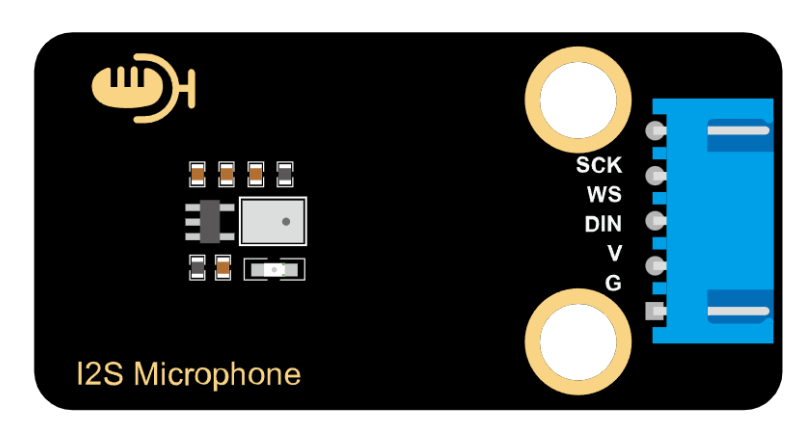
The SISTC Electronic Building Block MEMS Microphone Module (Developer Edition) is built around the high-performance WBC2718DT26TJ0-6/TR MEMS digital sound sensor and provides I2S digital audio output. It works seamlessly with popular platforms such as Arduino, ESP32, and other AIoT controllers.
1. Product Overview
This MEMS I2S digital microphone module captures subtle sound pressure variations and converts them into stable electrical signals. The module internally transforms the analog input into a 0–5V voltage range, followed by A/D processing and digital transmission via the I2S protocol.
Thanks to its compact size, high sensitivity, and low noise characteristics, the module is ideal for applications such as:
- Speech recognition (ASR)
- Far-field audio capture
- Environmental recording and acoustic analysis
- AI audio classification / machine learning
- Arduino & ESP32 educational / maker projects
Combined with the powerful processing capability of ESP32, developers can easily implement voice recognition, real-time audio visualization, AI training, and more.
2. Specifications
| Parameter | Value |
|---|---|
| Operating Voltage | 3.3–5V |
| Microphone Type | MEMS |
| Directivity | Omnidirectional (Top Port) |
| Output Interface | I2S |
| Sensitivity | -26 dB |
| Maximum SPL | 124 dB |
| Signal-to-Noise Ratio | 61 dB |
| Dimensions | 48 × 24 mm |
| Weight | 5.1 g |
These specifications ensure that the module performs reliably in low-noise environments while supporting high sound-pressure applications.
3. Schematic Overview
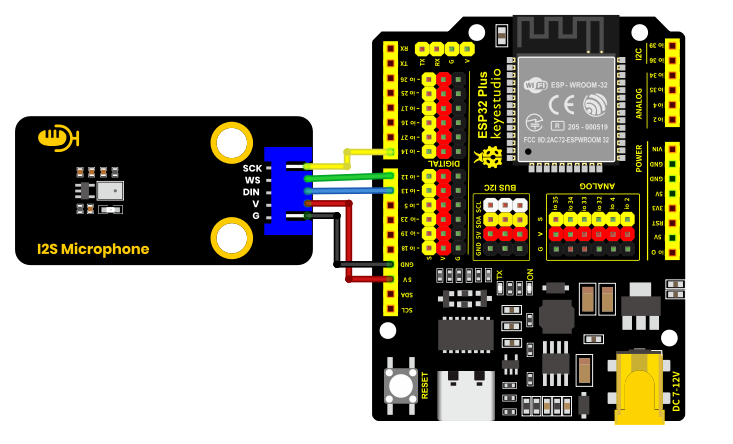
The module consists of a MEMS microphone core, front-end signal conditioning, and an I2S digital audio interface.
Main functional blocks include:
- MEMS sound sensor
- I2S digital interface
- Power regulation
- Signal conditioning circuitry
4. Connection Guide
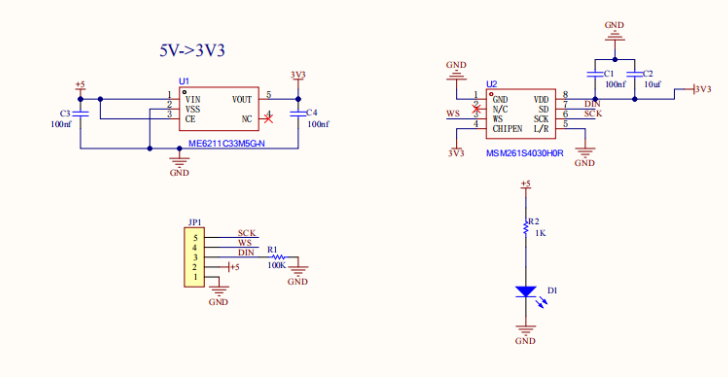
The module supports Arduino, ESP32, STM32, and similar controllers.
I2S pin definitions:
- SCK / BCLK – Bit clock
- WS / LRCLK – Left/Right clock
- SD – Data output
- VCC – 3.3–5V
- GND
ESP32 users can immediately record audio and visualize waveforms with simple example code.
5. Development Environment Setup (Arduino IDE)
Download Arduino IDE
Visit the official Arduino software page:
https://www.arduino.cc/en/software/#ide
Windows users can choose between:
- Installer version
- ZIP package (no installation required, just extract and run)
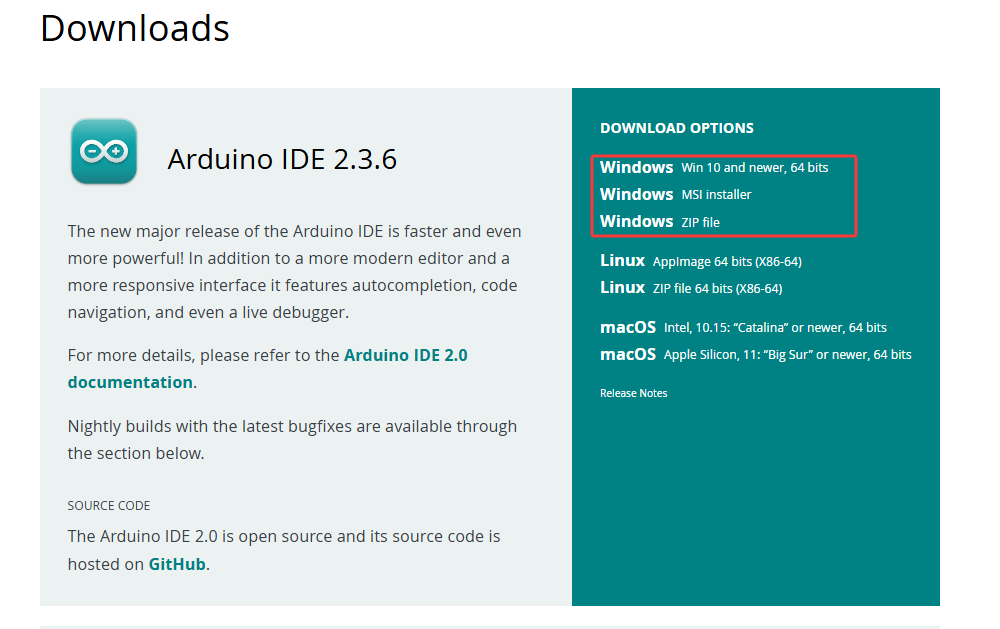
Here, we will take the Windows system as an example to introduce the steps for downloading and installing. There are also two versions for the Windows system: one is the installation version, and the other is the download version which does not require installation. You can simply download the file to your computer, unzip it, and then use it.
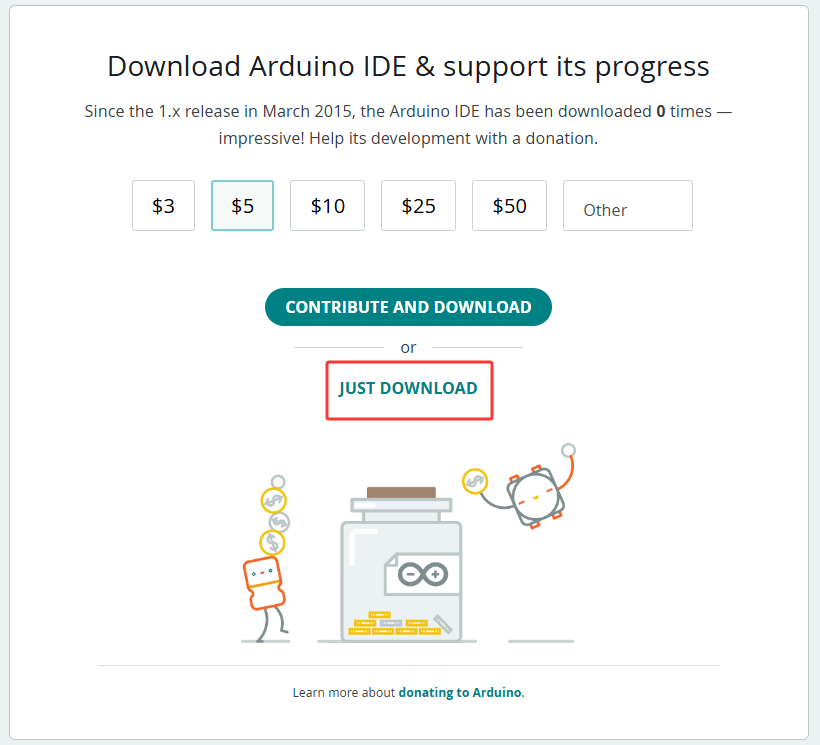
In general, we can download by clicking JUST DOWNLOAD.
Environment setup
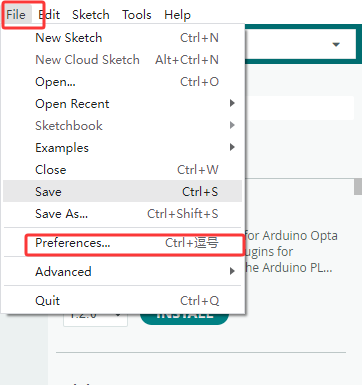
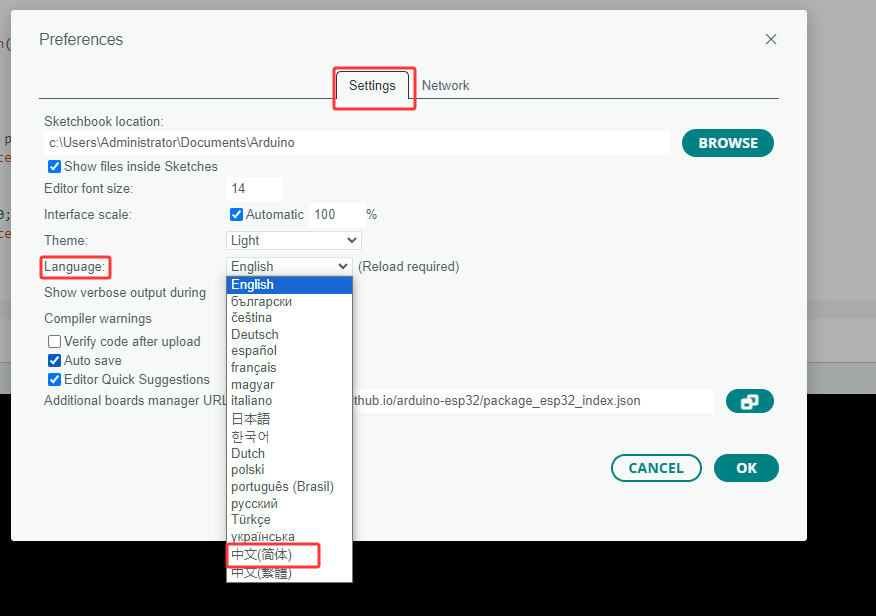
First, open the Arduino IDE. Go to File → Preferences → Settings → Language; change it to Simplified Chinese, then click “OK” – the language will switch automatically. (English is also an option; we’ll use Chinese as an example here.)
Install the corresponding development board platform
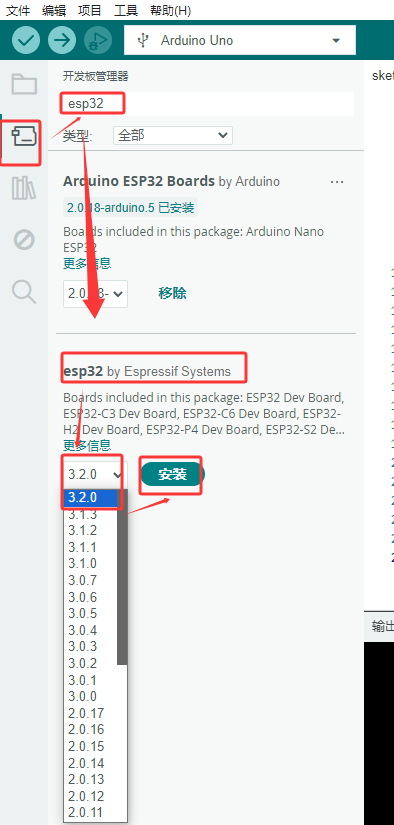
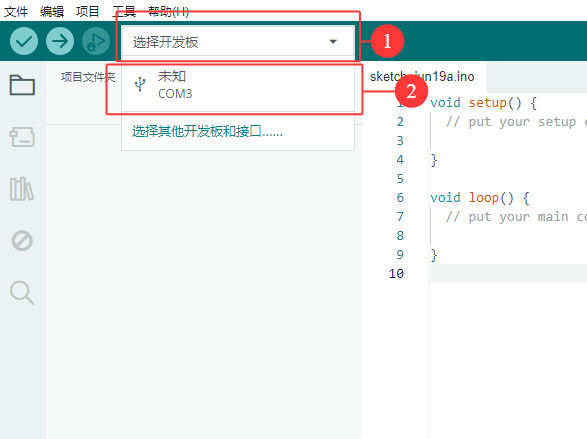
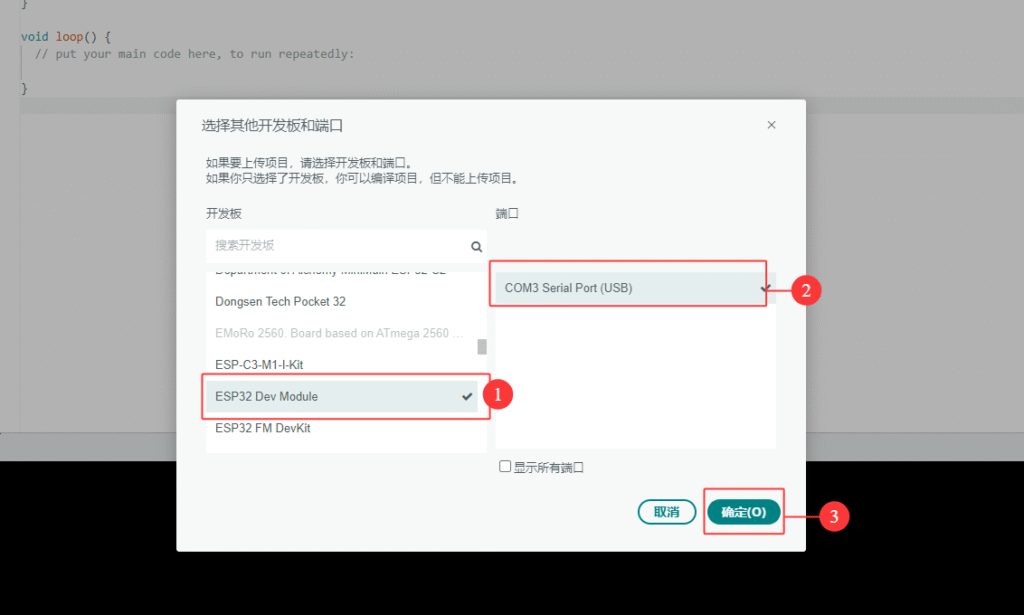
Click to select the development board, choose the corresponding port number, and select the corresponding development board platform.
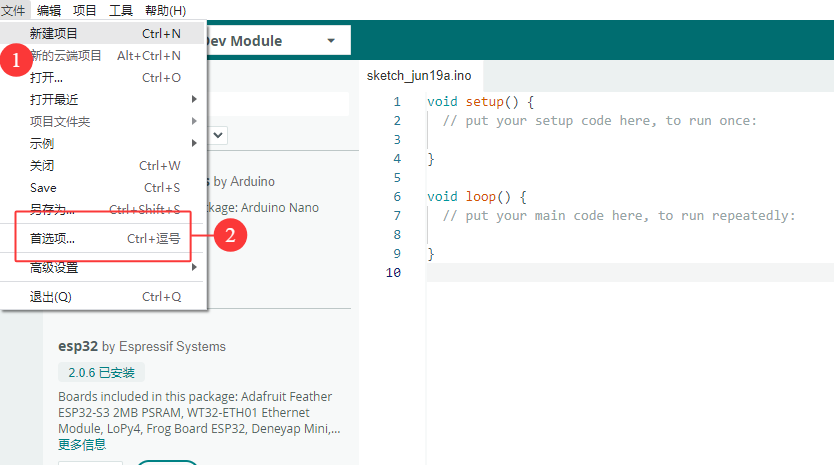
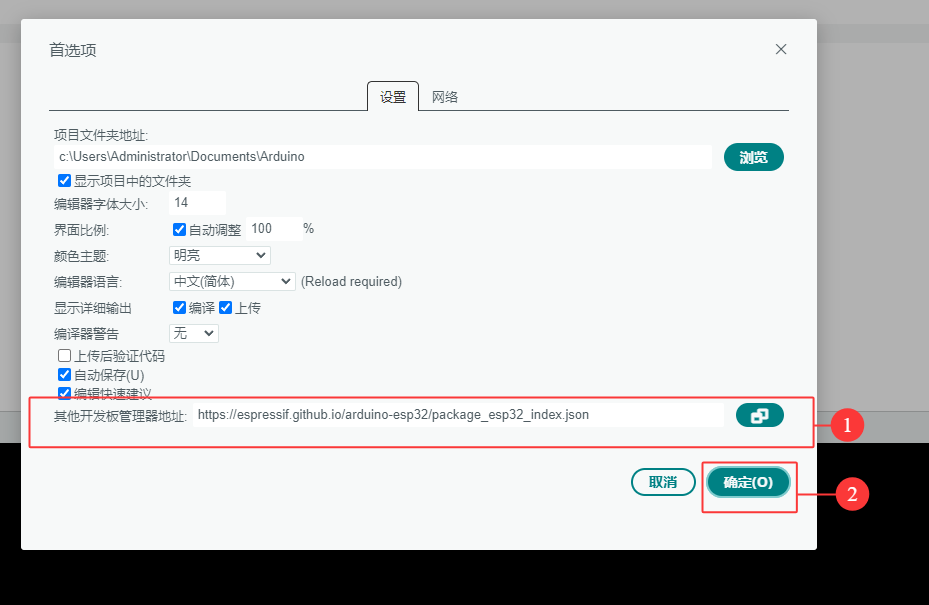
Click on “File” in the menu to find “Preferences”, click to enter, then in “Additional Board Manager URLs”, enter “https://espressif.github.io/arduino-esp32/package_esp32_index.json” and click “OK”.
To install the driver library required for the module, enter “ESP32-audioI2S-master” in the library management box and install the corresponding library file.
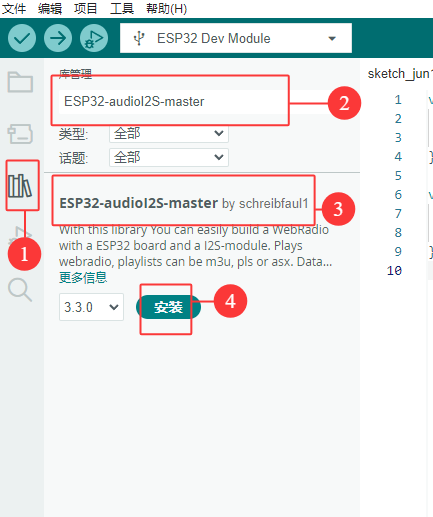
Then copy the following code into the editor and upload it to the ESP32 main board via ArduinoIDE.
#include "driver/i2s.h"
#define SAMPLE_RATE (44100)

#define I2S_MIC_WS 12
#define I2S_MIC_DIN 13
#define I2S_MIC_BCK 14
#define I2S_PORT I2S_NUM_0
#define bufferLen 64

int16_t sBuffer[bufferLen];

  // 安装I2S驱动
  void i2s_install(){

    // 配置I2S接收
    i2s_config_t i2s_config = {
      .mode = (i2s_mode_t)(I2S_MODE_MASTER | I2S_MODE_RX),
      .sample_rate = SAMPLE_RATE,
      .bits_per_sample = I2S_BITS_PER_SAMPLE_16BIT,
      .channel_format = I2S_CHANNEL_FMT_ONLY_LEFT,
      .communication_format = (i2s_comm_format_t)(I2S_COMM_FORMAT_I2S | I2S_COMM_FORMAT_I2S_MSB),
      .intr_alloc_flags = 0,
      .dma_buf_count = 16,
      .dma_buf_len = bufferLen,
      .use_apll = false
   };
   if (ESP_OK != i2s_driver_install(I2S_PORT, &i2s_config, 0, NULL)) {
      Serial.println("Install I2S driver failed");
      return;
     }
}

  // 配置I2S引脚
  void i2s_setpin(){

    i2s_pin_config_t pin_config = {};
    pin_config.bck_io_num = I2S_MIC_BCK;
    pin_config.ws_io_num = I2S_MIC_WS;
    pin_config.data_out_num = I2S_PIN_NO_CHANGE;
    pin_config.data_in_num = I2S_MIC_DIN;

   if (ESP_OK != i2s_set_pin(I2S_PORT, &pin_config)) {
    Serial.println("I2S set pin failed");
    return;
  }
 }

void setup() {

  Serial.begin(115200);
  Serial.println("Setup I2S ...");

  delay(1000);
  i2s_install();
  i2s_setpin();
  i2s_start(I2S_PORT);
  delay(500);
}


void loop() {
   size_t bytesIn = 0;
  esp_err_t result = i2s_read(I2S_PORT, &sBuffer, bufferLen, &bytesIn, portMAX_DELAY);
  if (result == ESP_OK)
  {
    int samples_read = bytesIn / 2;
    if (samples_read > 0) {
      float mean = 0;
      for (int i = 0; i < samples_read; ++i) {
        mean += (sBuffer[i]);
      }
      mean /= samples_read;
      Serial.println(mean);
      delay(50);
    }
  }

}
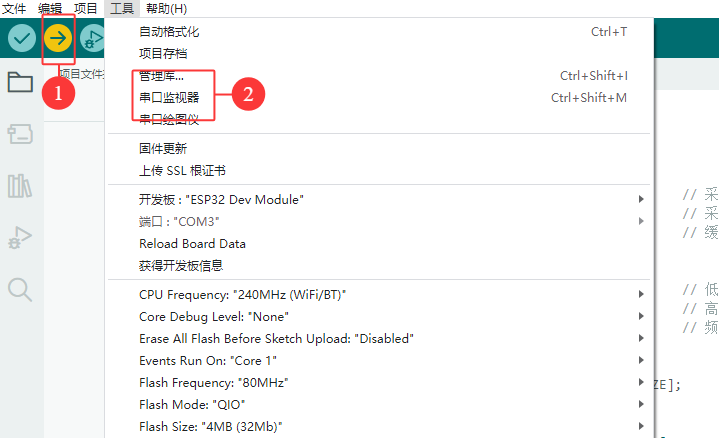
6. Test Results
After connecting the MEMS I2S microphone to ESP32 and running the sample code, developers can observe real-time waveform changes through serial plotter or visualization tools.
Test observations:
- Ambient noise produces irregular waveform patterns
- Blowing air toward the microphone causes significant waveform amplitude changes
- When no sound is present, the waveform remains stable
- Waveform transitions are clearly visible during repeated sound input tests
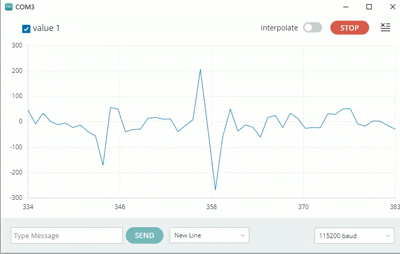
These results demonstrate that the module performs reliably for downstream applications including FFT analysis, ASR, and AI acoustic modeling.
7. Conclusion
The SISTC Electronic Building Block MEMS I2S Microphone Module (Developer Edition) provides:
- Easy wiring & setup
- High sensitivity & low noise
- Standard I2S digital output
- Excellent compatibility with ESP32 and Arduino
This makes it an ideal platform for beginners, educators, audio developers, and AI researchers.
Applicable scenarios:
- Speech recognition
- AI learning & audio classification
- Acoustic data collection
- STEM / maker education
- Smart device prototyping